使用nrm管理npm源
在国内npm install是巨慢无比,所以多数情况下我们会修改npm的源为国内源,比如淘宝的:https://registry.npm.taobao.org/
修改npm源地址
查看当前源地址
    $ npm config list
    //register 即为当前源地址
    ; cli configs
    metrics-registry = "https://registry.npm.taobao.org/"
    scope = ""
    user-agent = "npm/6.10.0 node/v12.3.1 darwin x64"

    ; userconfig /Users/guoxiaolong/.npmrc
    home = "https://npm.taobao.org"
    registry = "https://registry.npm.taobao.org/"

    ; builtin config undefined
    prefix = "/usr/local"

    ; node bin location = /usr/local/Cellar/node/12.3.1/bin/node
    ; cwd = /Users/guoxiaolong/Documents/angularIo
    ; HOME = /Users/guoxiaolong
    ; "npm config ls -l" to show all defaults.
修改当前源
npm set registry https://registry.npm.taobao.org/
这么做虽然能够达到目的,但有时候还是得用官方源,改来改去总归是不方便,所以我们需要使用淘宝的cnmp。
安装cnpm
可以使用定制的 cnpm (gzip 压缩支持) 命令行工具代替默认的 npm:
npm install -g cnpm --registry=https://registry.npm.taobao.org
使用
cnpm的使用除了不能publish外与npm无差别,比如 cnpm install vue.
虽然我们现在可以用cnpm来快速安装,也可以用官方npm来确保安装无误,但有时其他命令也会调用npm。
如果用vue脚手架来搭项目,他会问你用cnpm还是npm?但用angular脚手架create安装会直接调用npm进行install,然后就巨慢无比。。。。
使用nrm管理npm的源
nrm是专门用来管理和快速切换私人配置的registry
通过nrm就可以方便的切换npm的源地址,免受官方npm的慢速之苦。
安装
npm install nrm -g --save
使用
nrm ls 列出所有源
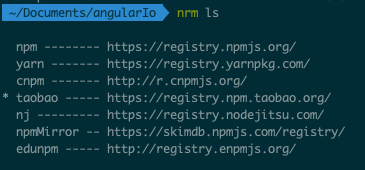
nrm use 使用某个源
nrm use npmnrm add 添加自定义源
nrm add meaoo http://registry.npm.meaoo.cn


评论
发表评论